To practice applying the conventions of business letters and using reader-centered communication, write two letters responding to the following scenario:
A small appliance store offers a “Best Price” guarantee: if a customer finds the exact product available at another store in their local market for a lower price within 30 days, they will refund the difference. One customer recently bought a blender for $60 at the store. Five weeks later, another store ran an ad in the newspaper advertising a sale price of the same blender for $47.
Claim Letter: As the customer, write a letter to the store manager requesting a refund of the price difference. Note that a copy of the sale ad is enclosed.
Adjustment Letter: As the manager, write an adjustment letter denying the refund request.
Invent reasonable details for this scenario. Consider how you, as the customer, might appeal to the manager to loosen the terms of the “Best Price” guarantee to your benefit. Consider how you, as the manager, might help the customer to feel acknowledged and valued even as you deliver bad news. Could you offer the customer a token of appreciation to soften the blow?
Review the chapters “Professional Communications” and “Audience Analysis” and be careful to include all of the conventional elements of a business letter.
2. AUDIENCE ANALYSIS
The audience of a technical writing—or any piece of writing for that matter—is the intended or
potential reader or readers. For most technical writers, this is the most important consideration in
planning, writing, and reviewing a document. You “adapt” your writing to meet the needs, interests,
and background of the readers who will be reading your writing. In reality, the lack of audience
analysis and adaptation is one of the root causes of most of the problems you find in professional,
technical documents—particularly instructions where it surfaces most glaringly.
Note: Once you’ve read this chapter on audiences, try using the audience planner. You fill in blanks
with answers to questions about your audience and then e-mail it to yourself and, optionally, to your
instructor. Use the audience planner for any writing project as a way of getting yourself to think about
your audience in detail.
Chapter Attribution Information
This chapter was derived by Annemarie Hamlin, Chris Rubio, and Michele DeSilva, Central Oregon
Community College, from Online Technical Writing by David McMurrey – CC: BY 4.0
2 . 1 T Y P E S O F AU D I E N C E S
One of the first things to do when you analyze an audience is to identify its type (or types—it’s rarely
just one type). The common division of audiences into categories is as follows:
• Experts: These are the people who know the business or organization (and possibly the theory
and the product) inside and out. They designed it, they tested it, they know everything about it.
Often, they have advanced degrees and operate in academic settings or in research and
development areas of the government and technology worlds.
• Technicians: These are the people who build, operate, maintain, and repair the items that the
experts design and theorize about. Theirs is a highly technical knowledge as well, but of a more
practical nature.
• Executives: These are the people who make business, economic, administrative, legal,
governmental, political decisions about the products of the experts and technicians. Executives are
likely to have as little technical knowledge about the subject as nonspecialists. For many of you,
this will be the primary audience.
• Nonspecialists: These readers have the least technical knowledge of all. They want to use the new
product to accomplish their tasks; they want to understand the new power technology enough to
know whether to vote for or against it in the upcoming bond election. Or, they may just be curious
about a specific technical matter and want to learn about it—but for no specific, practical reason.
Chances are, these readers will represent your secondary audience.
C H A P T E R AT T R I B U T I O N I N F O R M AT I O N
This chapter was derived by Annemarie Hamlin, Chris Rubio, and Michele DeSilva, Central Oregon
Community College, from Online Technical Writing by David McMurrey – CC: BY 4.0
TECHNICAL WRITING 21
2 . 2 AU D I E N C E A N A LY S I S
It’s important to determine which of the four categories just discussed represent your potential
audience(s), but that’s not the end of it. Audiences, regardless of category, must also be analyzed in
terms of characteristics such as the following:
• Background—knowledge, experience, training: One of your most important concerns is just
how much knowledge, experience, or training you can expect in your readers. If you expect some
of your readers to lack certain background, do you automatically supply it in your document?
Consider an example: imagine you are writing a guide to using a software product that runs under
Microsoft Windows. How much can you expect your readers to know about Windows? If some are
likely to know little about Windows, should you provide that information? If you say no, then you
run the risk of customers getting frustrated with your product. If you say yes to adding
background information on Windows, you increase your work effort and add to the page count of
the document (and thus to the cost). Obviously, there’s no easy answer to this question—part of the
answer may involve just how small a segment of the audience needs that background information.
• Needs and interests: To plan your document, you need to know what your audience is going to
expect from that document. Imagine how readers will want to use your document; what they will
demand from it. For example, imagine you are writing a manual on how to use a new
smartphone—what are your readers going to expect to find in it? Imagine you are under contract
to write a background report on global warming for a national real estate association—what do
readers want to read about; and, equally important, what do they not want to read about?
• Other demographic characteristics: And of course there are many other characteristics about
your readers that might have an influence on how you should design and write your
document—for example, age groups, type of residence, area of residence, gender, political
preferences, and so on.
Audience analysis can get complicated by at least two other factors: mixed audience types for one
document, wide variability within audience, and unknown audiences.
• More than one audience: You are likely to find that your report is for more than one audience.
For example, it may be seen by technical people (experts and technicians) and administrative
people (executives). What should you do in this case? You can either write all the sections so that all
the audiences of your document can understand them. Or you can write each section strictly for
the audience that would be interested in it, then use headings and section introductions to alert
your audience about where to find relevant information in your report.
22 ALLISON GROSS, ANNEMARIE HAMLIN, BILLY MERCK, CHRIS RUBIO, JODI NAAS, MEGAN SAVAGE, AND MICHELE DESILVA
• Wide variability in an audience: You may realize that, although you have an audience that fits
into only one category, its background varies widely. This is a tough one—if you write to the
lowest common denominator of reader, you are likely to end up with a cumbersome, tedious
book-like report that will turn off the majority of readers. However, if you don’t write to that
lowest level, you lose that segment of your readers. What should you do? Most writers go for the
majority of readers and sacrifice that minority that needs more help. Others put the supplemental
information in appendixes or insert cross-references to beginners’ books.
C H A P T E R AT T R I B U T I O N I N F O R M AT I O N
This chapter was derived by Annemarie Hamlin, Chris Rubio, and Michele DeSilva, Central Oregon
Community College, from Online Technical Writing by David McMurrey – CC: BY 4.0
TECHNICAL WRITING 23
2 . 3 A DA P T I N G YO U R W R I T I N G TO M E E T YO U R AU D I E N C E ’ S N E E D S
Once you’ve analyzed your audience, how do you use this information? How do you keep from
writing something that may potentially still be incomprehensible or useless to your readers? Draft
your document with your audience’s needs in mind, but remember that writing can be refined over
many drafts. With each subsequent draft, think more carefully about your readers, and revise and
edit your document so that you make technical information more understandable for nonspecialist
audiences. The lists below are some of the ways you can adapt your writing to your audience’s needs.
The following “controls” have mostly to do with making technical information more
understandable for nonspecialist audiences, and they refer to information you will refine as you begin
to put your final report together. However, it is a good idea to be aware of your audience’s needs even
in the early stages of your report drafting.
P ROV I D E T H E R I G H T I N F O R M AT I O N
Add information readers need to understand your document. Check to see whether certain key
information is missing—for example, a critical series of steps from a set of instructions; important
background that helps beginners understand the main discussion; definition of key terms.
Omit information your readers do not need. Unnecessary information can also confuse and
frustrate readers—after all, it’s there so they feel obligated to read it. For example, you can probably
chop theoretical discussion from basic instructions.
Change the level of the information you currently have. You may have the right information but
it may be “pitched” at too high or too low a technical level. It may be pitched at the wrong kind of
audience—for example, at an expert audience rather than a technician audience. This happens most
often when product-design notes are passed off as instructions.
Add examples to help readers understand. Examples are one of the most powerful ways to
connect with audiences, particularly in instructions. Even in a non-instructional text, for example,
when you are trying to explain a technical concept, examples are a major help—analogies in particular.
Change the level of your examples. You may be using examples but the technical content or level
may not be appropriate to your readers. Homespun examples may not be useful to experts; highly
technical ones may totally miss your nonspecialist readers.
G U I D E YO U R R E A D E R T H RO U G H YO U R W R I T I N G
Change the organization of your information. Sometimes, you can have all the right information
but arrange it in the wrong way. For example, there can be too much background information up
front (or too little) such that certain readers get lost. Sometimes, background information needs to be
24 ALLISON GROSS, ANNEMARIE HAMLIN, BILLY MERCK, CHRIS RUBIO, JODI NAAS, MEGAN SAVAGE, AND MICHELE DESILVA
https://level.It
consolidated into the main information—for example, in instructions it’s sometimes better to feed in
chunks of background at the points where they are immediately needed.
Strengthen transitions. It may be difficult for readers, particularly nonspecialists, to see the
connections between the main sections of your report, between individual paragraphs, and sometimes
even between individual sentences. You can make these connections much clearer by adding transition
words and by echoing key words more accurately. Words like “therefore,” “for example,” “however” are
transition words—they indicate the logic connecting the previous thought to the upcoming thought.
You can also strengthen transitions by carefully echoing the same key words. A report describing new
software for architects might use the word software several times on the same page or even in the
same paragraph. In technical prose, it’s not a good idea to vary word choice—use the same words so
that people don’t get any more confused than they may already be.
Write stronger introductions—both for the whole document and for major sections. People
seem to read with more confidence and understanding when they have the “big picture”—a view of
what’s coming, and how it relates to what they’ve just read. Therefore, write a strong introduction
to the entire document—one that makes clear the topic, purpose, audience, and contents of that
document. And for each major section within your document, use mini-introductions that indicate at
least the topic of the section and give an overview of the subtopics to be covered in that section.
Create topic sentences for paragraphs and paragraph groups. It can help readers immensely to
give them an idea of the topic and purpose of a section (a group of paragraphs) and in particular to give
them an overview of the subtopics about to be covered. Road maps help when you’re in a different
state!
C R A F T E F F E C T I V E S E N T E N C E S
Change sentence style and length. How you write—down at the individual sentence level—can
make a big difference too. In instructions, for example, using imperative voice and “you” phrasing
is vastly more understandable than the passive voice or third-personal phrasing. For some reason,
personalizing your writing style and making it more relaxed and informal can make it more accessible
and understandable. Passive, person-less writing is harder to read—put people and action in your
writing. Similarly, go for active verbs as opposed to be verb phrasing. All of this makes your writing
more direct and immediate—readers don’t have to dig for it. And obviously, sentence length matters
as well. An average of somewhere between 15 and 25 words per sentence is about right; sentences
over 30 words are to be mistrusted.
Edit for sentence clarity and economy. This is closely related to the previous “control” but
deserves its own spot. Often, writing style can be so wordy that it is hard or frustrating to read. When
you revise your rough drafts, put them on a diet—go through a draft line by line trying to reduce the
overall word, page, or line count by 20 percent. Try it as an experiment and see how you do. You’ll
find a lot of fussy, unnecessary detail and inflated phrasing you can chop out.
M A K E YO U R D O C U M E N T V I S UA L LY A P P E A L I N G
Add and vary graphics. For nonspecialist audiences, you may want to use more graphics—and
simpler ones at that. Graphics for specialists are more detailed, more technical. In technical
documents for nonspecialists, there also tend to be more “decorative” graphics—ones that are
attractive but serve no strict informative or persuasive purpose at all.
Break text up or consolidate text into meaningful, usable chunks. For nonspecialist readers, you
TECHNICAL WRITING 25
may need to have shorter paragraphs. Maybe a 6- to 8-line paragraph is the usual maximum. Notice
how much longer paragraphs are in technical documents written for specialists.
Add cross-references to important information. In technical information, you can help
nonspecialist readers by pointing them to background sources. If you can’t fully explain a topic on the
spot, point to a section or chapter where it is.
Use headings and lists. Readers can be intimidated by big dense paragraphs of writing, uncut by
anything other than a blank line now and then. Search your rough drafts for ways to incorporate
headings—look for changes in topic or subtopic. Search your writing for listings of things—these can
be made into vertical lists. Look for paired listings such as terms and their definitions—these can
be made into two-column lists. Of course, be careful not to force this special formatting, and don’t
overdo it.
Use special typography, and work with margins, line length, line spacing, type size, and type
style. For nonspecialist readers, you can do things like making the lines shorter (bringing in the
margins), using larger type sizes, and other such tactics. Typically, sans-serif fonts, such as Ariel, are
useful for online readers. Serif fonts, such as Time New Roman, are useful for print texts.
By now you should be able to see that many of the decisions you make as a technical writer
depend on who will read your report. From content, to language, to layout, every aspect of your
communication must keep your readers’ needs in mind.
We will spend time later in this book expanding our discussion of audience as well as document
design–an important consideration that can help tremendously in making your document
professional and easy to read.
C H A P T E R AT T R I B U T I O N I N F O R M AT I O N
This chapter was derived by Annemarie Hamlin, Chris Rubio, and Michele DeSilva, Central Oregon
Community College, from Online Technical Writing by David McMurrey – CC: BY 4.0
26 ALLISON GROSS, ANNEMARIE HAMLIN, BILLY MERCK, CHRIS RUBIO, JODI NAAS, MEGAN SAVAGE, AND MICHELE DESILVA
1. PROFESSIONAL COMMUNICATIONS
Professional communication in written form requires skill and expertise. From text messages to
reports, how you represent yourself with the written word counts. Writing in an online environment
requires tact, skill, and an awareness that what you write may be there forever. From memos to letters,
from business proposals to press releases, your written business communication represents you and
your company: your goal is to make it clear, concise, and professional.
Chapter Attribution Information
This chapter was derived by Annemarie Hamlin, Chris Rubio, and Michele DeSilva, Central Oregon
Community College, from the following sources:
• Online Technical Writing by David McMurrey – CC: BY 4.0
• Professional Writing by Saylor Academy – CC: BY 3.0
• Communicating Online: Netiquette by UBC Centre for Teaching, Learning and Technology –
CC: BY-SA 4.0
1.1 TEXTING
Text messages and e-mails are part of our communication landscape, and skilled business
communicators consider them a valuable tool to connect.
Whatever digital device you use, written communication in the form of brief messages, or texting,
has become a common way to connect. It is useful for short exchanges, and is a convenient way to stay
connected with others when talking on the phone would be cumbersome. Texting is not useful for
long or complicated messages, and careful consideration should be given to the audience. Although
texting will not be used in this class as a form of professional communication, you should be aware of
several of the principles that should guide your writing in this context.
When texting, always consider your audience and your company, and choose words, terms, or
abbreviations that will deliver your message appropriately and effectively.
TIPS FOR EFFECTIVE BUSINESS TEXTING
• Know your recipient. “? % dsct” may be an understandable way to ask a close associate what the
proper discount is to offer a certain customer, but if you are writing a text to your boss, it might be
wiser to write, “what % discount does Murray get on $1K order?”
• Anticipate unintentional misinterpretation. Texting often uses symbols and codes to represent
thoughts, ideas, and emotions. Given the complexity of communication, and the useful but limited
tool of texting, be aware of its limitation and prevent misinterpretation with brief messages.
• Contacting someone too frequently can border on harassment. Texting is a tool. Use it when
appropriate but don’t abuse it.
• Don’t text and drive. Research shows that the likelihood of an accident increases dramatically if
the driver is texting behind the wheel. 1 Being in an accident while conducting company business
would reflect poorly on your judgment as well as on your employer.
CHAPTER ATTRIBUTION INFORMATION
This chapter was derived by Annemarie Hamlin, Chris Rubio, and Michele DeSilva, Central Oregon
Community College, from the following sources:
• Online Technical Writing by David McMurrey – CC: BY 4.0
• Professional Writing by Saylor Academy – CC: BY 3.0
1. Houston Chronicle. (2009, September 23). Deadly distraction: Texting while driving, twice as risky as drunk driving, should be banned. Houston
Chronicle (3 STAR R.O. ed.), p. B8. Retrieved from http://www.chron.com/opinion/editorials/article/Deadly-distraction-Texting-while-
driving-should-1592397.php
TECHNICAL WRITING 7
http://www.chron.com/opinion/editorials/article/Deadly-distraction-Texting-while
1.2 E-MAIL
E-mail is familiar to most students and workers. It may be used like text, or synchronous chat, and
it can be delivered to a cell phone. In business, email has largely replaced print hard copy letters for
external (outside the company) correspondence, and in many cases, it has taken the place of memos
for internal (within the company) communication.1 E-mail can be very useful for messages that have
slightly more content than a text message, but it is still best used for fairly brief messages. Many
businesses use automated e-mails to acknowledge communications from the public, or to remind
associates that periodic reports or payments are due. You may also be assigned to “populate” a form
e-mail in which standard paragraphs are used, but you choose from a menu of sentences to make the
wording suitable for a particular transaction.
E-mails may be informal in personal contexts, but business communication requires attention to
detail, awareness that your e-mail reflects you and your company, and a professional tone so that it
may be forwarded to any third party if needed. E-mail often serves to exchange information within
organizations. Although e-mail may have an informal feel, remember that when used for business, it
needs to convey professionalism and respect. Never write or send anything that you wouldn’t want
read in public or in front of your company president.
TIPS FOR EFFECTIVE BUSINESS E-MAILS
As with all writing, professional communications require attention to the specific writing context,
and it may surprise you that even elements of form can indicate a writer’s strong understanding of
audience and purpose. The principles explained here apply to the educational context as well; use
them when communicating with your instructors and classroom peers.
• Open with a proper salutation. Proper salutations demonstrate respect and avoid mix-ups in case
a message is accidentally sent to the wrong recipient. For example, use a salutation like “Dear Ms.
X” (external) or “Hi Barry” (internal). Never use the title Mrs. as you cannot assume a woman is
married. If the gender of a person is not evident, use their entire name, like this: “Dear Sam Jones”
• Include a clear, brief, and specific subject line. This helps the recipient understand the essence of
the message. For example, “Proposal attached” or “Your question of 10/25.”
• Close with a signature. Identify yourself by creating a signature block that automatically contains
your name and business contact information.
• Avoid abbreviations. An e-mail is not a text message, and the audience may not find your wit
cause to ROTFLOL (roll on the floor laughing out loud).
1. Guffey, M. (2008). Essentials of business communication (7th ed.). Mason, OH: Thomson/Wadsworth.
8 ALLISON GROSS, ANNEMARIE HAMLIN, BILLY MERCK, CHRIS RUBIO, JODI NAAS, MEGAN SAVAGE, AND MICHELE DESILVA
• Be brief. Omit unnecessary words.
• Use a good format. Divide your message into brief paragraphs for ease of reading. A good e-mail
should get to the point and conclude in three small paragraphs or less.
• Reread, revise, and review. Catch and correct spelling and grammar mistakes before you press
“send.” It will take more time and effort to undo the problems caused by a hasty, poorly written e-
mail than to get it right the first time.
• Reply promptly. Watch out for an emotional response—never reply in anger—but make a habit of
replying to all e-mails within twenty-four hours, even if only to say that you will provide the
requested information in forty-eight or seventy-two hours.
• Use “Reply All” sparingly. Do not send your reply to everyone who received the initial e-mail
unless your message absolutely needs to be read by the entire group.
• Avoid using all caps. Capital letters are used on the Internet to communicate emphatic emotion
or yelling and are considered rude.
• Test links. If you include a link, test it to make sure it is working.
• E-mail ahead of time if you are going to attach large files (audio and visual files are often quite
large) to prevent exceeding the recipient’s mailbox limit or triggering the spam filter.
• Give feedback or follow up. If you don’t get a response in twenty-four hours, e-mail or call. Spam
filters may have intercepted your message, so your recipient may never have received it.
Figure 1 shows a sample email that demonstrates the principles listed above.
Figure 1. Sample email
From: Steve Jobs
To: Human Resources Division
Subject: Safe Zone Training
Dear Colleagues:
Please consider signing up for the next available Safe Zone workshop offered by the College. As you know, our department is working toward
increasing the number of Safe Zone volunteers in our area, and I hope several of you may be available for the next workshop scheduled for Friday,
October 9.
For more information on the Safe Zone program, please visit http://www.cocc.edu/multicultural/safe-zone-training/
Please let me know if you will attend.
Steve Jobs
CEO Apple Computing
sjobs@apple.com
CHAPTER ATTRIBUTION INFORMATION
This chapter was derived by Annemarie Hamlin, Chris Rubio, and Michele DeSilva, Central Oregon
Community College, from the following sources:
• Online Technical Writing by David McMurrey – CC: BY 4.0
• Professional Writing by Saylor Academy – CC: BY 3.0
TECHNICAL WRITING 9
mailto:sjobs@apple.com
https://visithttp://www.cocc.edu/multicultural/safe-zone-training
mailto:hr@apple.com
mailto:sjobs@apple.com
1.3 NETIQUETTE
Netiquette refers to etiquette, or protocols and norms for communication, on the Internet. We create
personal pages, post messages, and interact via online technologies as a normal part of our careers,
but how we conduct ourselves can leave a lasting image, literally. The photograph you posted on your
Facebook page or Twitter feed may have been seen by your potential employer, or that nasty remark
in a post may come back to haunt you later.
Following several guidelines for online postings, as detailed below, can help you avoid
embarrassment later.
KNOW YOUR CONTEXT
• Introduce yourself.
• Avoid assumptions about your readers. Remember that culture influences communication style
and practices.
• Familiarize yourself with policies on Acceptable Use of IT Resources at your organization. (One
example of a college’s acceptable use policy can be found here: https://www.cocc.edu/
departments/its/network-administration/files/
cocc_acceptable_use_of_information_technology_resources_12 / )
REMEMBER THE HUMAN
• Remember there is a person behind the words. Ask for clarification before making judgement.
• Check your tone before you publish.
• Respond to people using their names.
• Remember that culture and even gender can play a part in how people communicate.
• Remain authentic and expect the same of others.
• Remember that people may not reply immediately. People participate in different ways, some just
by reading the communication rather than jumping into it.
• Avoid jokes and sarcasm; they often don’t translate well to the online environment.
RECOGNIZE THAT TEXT IS PERMANENT
• Be judicious. What you say online is difficult to retract later.
• Consider your responsibility to the group and to the working environment.
10 ALLISON GROSS, ANNEMARIE HAMLIN, BILLY MERCK, CHRIS RUBIO, JODI NAAS, MEGAN SAVAGE, AND MICHELE DESILVA
https://here:https://www.cocc.edu
• Agree on ground rules for text communication (formal or informal; seek clarification whenever
needed, etc) if you are working collaboratively.
AVOID FLAMING: RESEARCH BEFORE YOU REACT
• Accept and forgive mistakes.
• Consider your responsibility to the group and to the working environment.
• Seek clarification before reacting.
• Ask your supervisor for guidance.*
RESPECT PRIVACY AND ORIGINAL IDEAS
• Quote the original author if you are responding to a specific point made by someone else.
• Ask the author of an email for permission before forwarding the communication.
* Sometimes, online behavior can appear so disrespectful and even hostile that it requires
attention and follow up. In this case, let your supervisor know right away so that the right
resources can be called upon to help.
CHAPTER ATTRIBUTION INFORMATION
This chapter was derived by Annemarie Hamlin, Chris Rubio, and Michele DeSilva, Central Oregon
Community College, from Communicating Online: Netiquette by UBC Centre for Teaching,
Learning and Technology – CC: BY-SA 4.0
TECHNICAL WRITING 11
1.4 MEMORANDUMS
A memo (or memorandum, meaning “reminder”) is normally used for communicating policies,
procedures, or related official business within an organization. It is often written from a one-to-all
perspective (like mass communication), broadcasting a message to an audience, rather than a one-
on-one, interpersonal communication. It may also be used to update a team on activities for a given
project, or to inform a specific group within a company of an event, action, or observance.
MEMO PURPOSE
A memo’s purpose is often to inform, but it occasionally includes an element of persuasion or a
call to action. All organizations have informal and formal communication networks. The unofficial,
informal communication network within an organization is often called the grapevine, and it is often
characterized by rumor, gossip, and innuendo. On the grapevine, one person may hear that someone
else is going to be laid off and start passing the news around. Rumors change and transform as they
are passed from person to person, and before you know it, the word is that they are shutting down
your entire department.
One effective way to address informal, unofficial speculation is to spell out clearly for all employees
what is going on with a particular issue. If budget cuts are a concern, then it may be wise to send
a memo explaining the changes that are imminent. If a company wants employees to take action,
they may also issue a memorandum. For example, on February 13, 2009, upper management at the
Panasonic Corporation issued a declaration that all employees should buy at least $1,600 worth of
Panasonic products. The company president noted that if everyone supported the company with
purchases, it would benefit all.1
While memos do not normally include a call to action that requires personal spending, they
often represent the business or organization’s interests. They may also include statements that align
business and employee interest, and underscore common ground and benefit.
MEMO FORMAT
A memo has a header that clearly indicates who sent it and who the intended recipients are. Pay
particular attention to the title of the individual(s) in this section. Date and subject lines are also
present, followed by a message that contains a declaration, a discussion, and a summary.
In a standard writing format, we might expect to see an introduction, a body, and a conclusion. All
these are present in a memo, and each part has a clear purpose. The declaration in the opening uses
a declarative sentence to announce the main topic. The discussion elaborates or lists major points
1. Lewis, L. (2009, February 13). Panasonic orders staff to buy £1,000 in products. Retrieved from http://business.timesonline.co.uk/tol/business/
markets/japan/article5723942.ece
12 ALLISON GROSS, ANNEMARIE HAMLIN, BILLY MERCK, CHRIS RUBIO, JODI NAAS, MEGAN SAVAGE, AND MICHELE DESILVA
http://business.timesonline.co.uk/tol/business
associated with the topic, and the conclusion serves as a summary. Figure 2 provides a sample memo
using the format explained above.
Figure 2. Sample memo (click image for an accessible PDF)
FIVE TIPS FOR EFFECTIVE BUSINESS MEMOS
AUDIENCE ORIENTATION
Always consider the audience and their needs when preparing a memo. An acronym or abbreviation
that is known to management may not be known by all the employees of the organization, and
if the memo is to be posted and distributed within the organization, the goal is clear and concise
communication at all levels with no ambiguity.
PROFESSIONAL , FORMAL TONE
Memos are often announcements, and the person sending the memo speaks for a part or all of the
organization. While it may contain a request for feedback, the announcement itself is linear, from
the organization to the employees. The memo may have legal standing as it often reflects policies or
procedures, and may reference an existing or new policy in the employee manual, for example.
SUBJECT EMPHASIS
The subject is normally declared in the subject line and should be clear and concise. If the memo is
TECHNICAL WRITING 13
announcing the observance of a holiday, for example, the specific holiday should be named in the
subject line—for example, use “Thanksgiving weekend schedule” rather than “holiday observance.”
DIRECT FORMAT
Some written business communication allows for a choice between direct and indirect formats, but
memorandums are always direct. The purpose is clearly announced.
OBJECTIVITY
Memos are a place for just the facts, and should have an objective tone without personal bias,
preference, or interest on display. Avoid subjectivity.
CHAPTER ATTRIBUTION INFORMATION
This chapter was derived by Annemarie Hamlin, Chris Rubio, and Michele DeSilva, Central Oregon
Community College, from the following sources:
• Online Technical Writing by David McMurrey – CC: BY 4.0
• Professional Writing by Saylor Academy – CC: BY 3.0
14 ALLISON GROSS, ANNEMARIE HAMLIN, BILLY MERCK, CHRIS RUBIO, JODI NAAS, MEGAN SAVAGE, AND MICHELE DESILVA
1.5 LETTERS
Letters are usually brief messages (one to two pages) sent to recipients that are often outside the
organization. They are often printed on letterhead paper and represent the business or organization.
While e-mail and text messages may be used more frequently today, the effective business letter
remains a common form of written communication. It can serve to introduce you to a potential
employer, announce a product or service, or even serve to communicate feelings and emotions. We’ll
examine the basic outline of a letter and then focus on specific products or, if for a college course,
writing assignments.
All letters have expectations in terms of language and format. The audience or readers may have
their own ideas of what constitutes a specific type of letter, and your organization may have its
own format and requirements. This chapter outlines common elements across letters, and attention
should be directed to the expectations associated with your particular writing assignment. There are
many types of letters, and many adaptations in terms of form and content, but in this chapter, we
discuss the fifteen elements of a traditional block-style letter. Letters may serve to introduce your
skills and qualifications to prospective employers, deliver important or specific information, or serve
as documentation of an event or decision. Figure 3 demonstrates a cover letter that might introduce a
technical report to its recipient.
Figure 3. Sample cover letter (click image for an accessible PDF)
TECHNICAL WRITING 15
STRATEGIES FOR EFFECTIVE LETTERS
Remember that a letter has five main areas:
1. The heading, which names the recipient, often including address and date
2. The introduction, which establishes the purpose
3. The body, which articulates the message
4. The conclusion, which restates the main point and may include a call to action
5. The signature line, which sometimes includes the contact information
Always remember that letters represent you and your company in your absence. In order to
communicate effectively and project a positive image, remember that
• your language should be clear, concise, specific, and respectful;
• each word should contribute to your purpose;
16 ALLISON GROSS, ANNEMARIE HAMLIN, BILLY MERCK, CHRIS RUBIO, JODI NAAS, MEGAN SAVAGE, AND MICHELE DESILVA
• each paragraph should focus on one idea;
• the parts of the letter should form a complete message;
• the letter should be free of errors.
LETTERS WITH SPECIFIC PURPOSES
Cover letters. When you send a report or some other document to your supervisor, send it with a
cover letter that briefly explains the purpose of the report and your major findings. Although your
supervisor may have authorized the project and received periodic updates from you, s/he probably
has many other employees and projects going and would benefit from a reminder about your work.
Letters of inquiry. You may want to request information about a company or organization such as
whether they anticipate job openings in the near future or whether they fund grant proposals from
non-profit groups. In this case, you would send a letter of inquiry, asking for additional information.
As with most business letters, keep your request brief, introducing yourself in the opening paragraph
and then clearly stating your purpose and/or request in the second paragraph. If you need very
specific information, consider placing your requests in list form for clarity. Conclude in a friendly
way that shows appreciation for the help you will receive.
Job application letters. Whether responding to job announcements online or on paper, you are
likely to write a job application letter introducing yourself and your skills to a potential employer.
This letter often sets a first impression of you, so demonstrate professionalism in your format,
language use, and proofreading of your work. Depending on the type of job you are seeking,
application letters will vary in length and content. In business, letters are typically no more than
one page and simply highlight skills and qualifications that appear in an accompanying resume. In
education, letters are typically more fully developed and contain a more detailed discussion of the
applicant’s experience and how that experience can benefit the institution. These letters provide
information that is not necessarily evident in an enclosed resume or curriculum vitae.
Follow-up letters. Any time you have made a request of someone, write a follow-up letter
expressing your appreciation for the time your letter-recipient has taken to respond to your needs
or consider your job application. If you have had a job interview, the follow-up letter thanking the
interviewer for his/her time is especially important for demonstrating your professionalism and
attention to detail.
Letters within the professional context may take on many other purposes, but these four types of
letters are some of the most common that you will encounter. For additional examples of professional
letters, take a look at the sample letters provided by David McMurrey in his online textbook on
technical writing: https://www.prismnet.com/~hcexres/textbook/models.html
CHAPTER ATTRIBUTION INFORMATION
This chapter was derived by Annemarie Hamlin, Chris Rubio, and Michele DeSilva, Central Oregon
Community College, from the following sources:
• Online Technical Writing by David McMurrey – CC: BY 4.0
• Professional Writing by Saylor Academy – CC: BY 3.0
TECHNICAL WRITING 17
Essay Writing Service Features
Our Experience
No matter how complex your assignment is, we can find the right professional for your specific task. Achiever Papers is an essay writing company that hires only the smartest minds to help you with your projects. Our expertise allows us to provide students with high-quality academic writing, editing & proofreading services.
Free Features
Free revision policy
$10Free bibliography & reference
$8Free title page
$8Free formatting
$8How Our Dissertation Writing Service Works
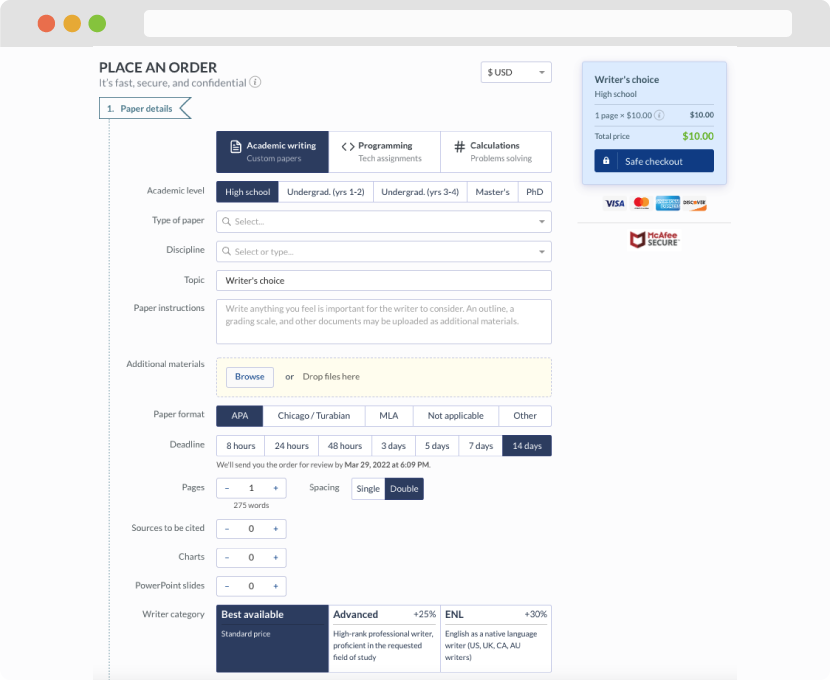
First, you will need to complete an order form. It's not difficult but, if anything is unclear, you may always chat with us so that we can guide you through it. On the order form, you will need to include some basic information concerning your order: subject, topic, number of pages, etc. We also encourage our clients to upload any relevant information or sources that will help.
Complete the order form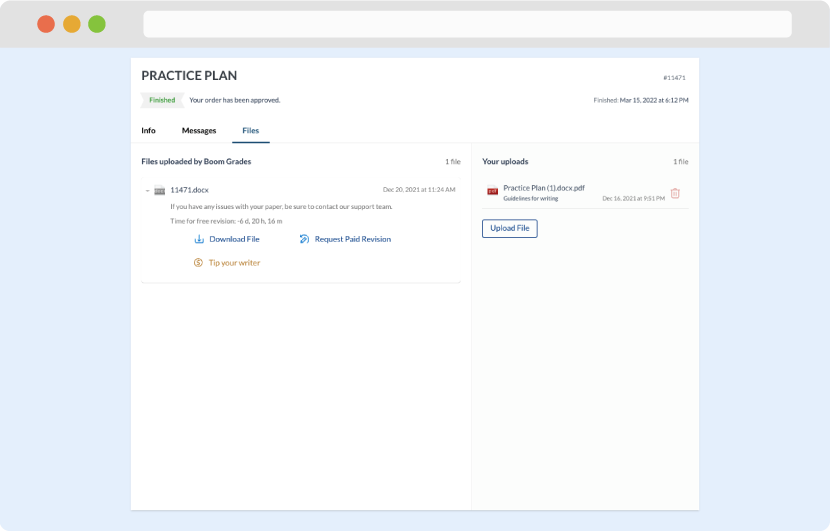
Once we have all the information and instructions that we need, we select the most suitable writer for your assignment. While everything seems to be clear, the writer, who has complete knowledge of the subject, may need clarification from you. It is at that point that you would receive a call or email from us.
Writer’s assignment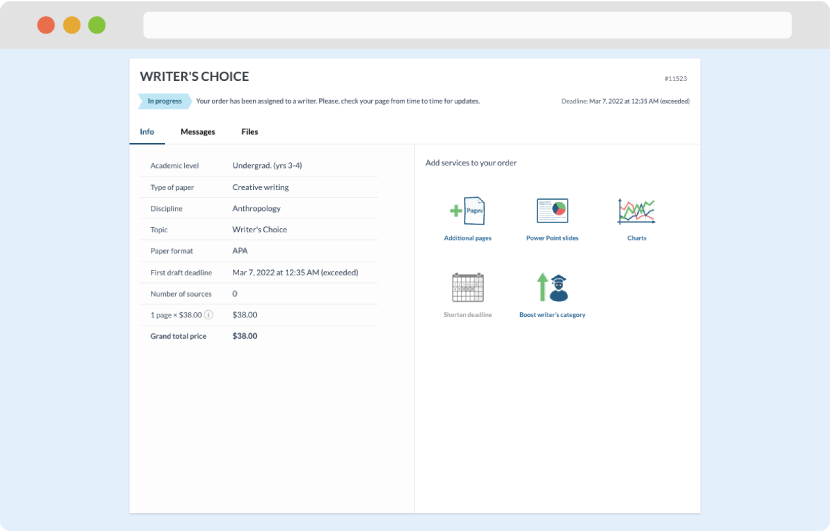
As soon as the writer has finished, it will be delivered both to the website and to your email address so that you will not miss it. If your deadline is close at hand, we will place a call to you to make sure that you receive the paper on time.
Completing the order and download